
Last updated on September 29th, 2026 at 12:00 pm
If you’re looking at HeyGen because you don’t want to set up a camera, light a shot, or hire a presenter, there’s one thing worth knowing before you pick a plan: the monthly price is only half the story.
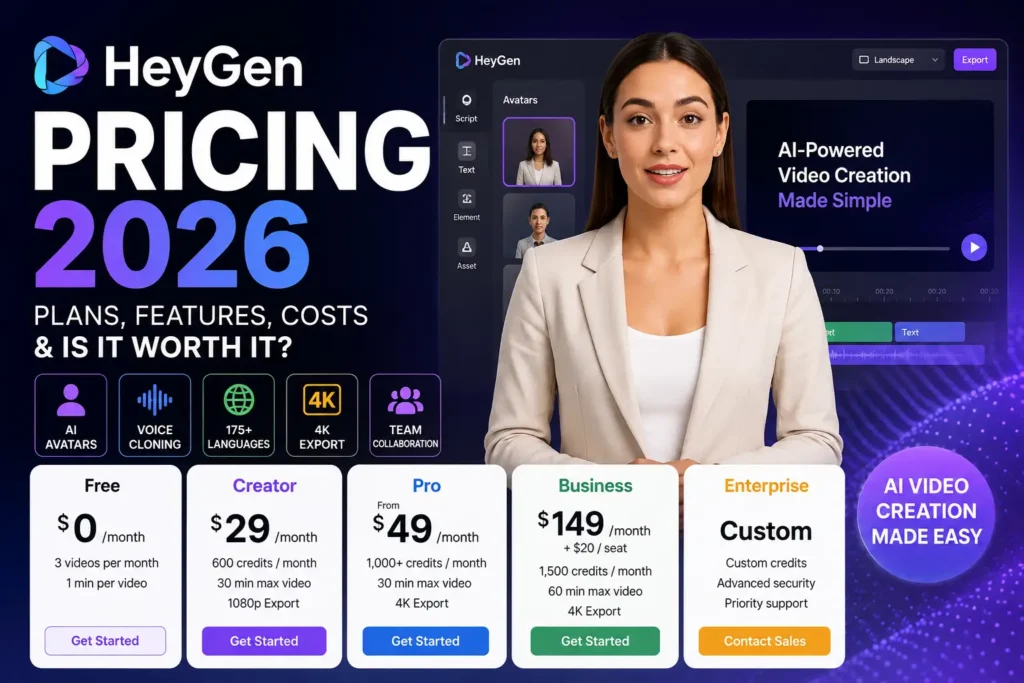
HeyGen’s paid plans run on credits, not flat video minutes. Creator costs $29/month, Pro starts at $49/month, and Business is $149/month plus $20 per seat — but how far those credits stretch depends entirely on which avatar model and features you use. A $29 plan can be plenty for one creator and tight for another, even if they’re both making five-minute videos.
So instead of just listing numbers, this guide walks through the questions that actually decide whether HeyGen is worth paying for:
- How much does HeyGen cost in 2026, plan by plan?
- Is the Free plan good enough to actually use?
- What’s the real difference between Creator and Pro?
- How far do 600 or 1,000 credits really go?
- When does Business make sense — and when is it overkill?
- Do unused credits roll over, and what happens if you run out?
- Is there a separate cost for the API?
- Which plan should you actually choose?
Every number below was checked against HeyGen’s official pricing page and its credit-based pricing guide in August 2026. Where third-party sources disagreed with HeyGen’s own page, I went with what HeyGen itself lists.
In This Article
ToggleQuick Verdict
Overall Rating: 9/10
Best for: YouTubers, marketers, coaches, educators, social media managers, agencies, and businesses that need presenter-led or multilingual video.
Best plan for most solo creators: Creator
Best plan for heavier individual use: Pro
Best plan for teams: Business
Biggest strength: You can produce a professional, presenter-led video without a camera, a studio, or an editor.
Biggest weakness: The credit system means your real monthly output depends on which avatar model and features you use — not just which plan you’re on.
Bottom line: HeyGen earns its price if video is a regular part of your workflow. If you only need a handful of short videos a year, start with Free before paying for anything.
HeyGen Pricing 2026 at a Glance

Plan | Monthly Price | Credits | Max Video Length | Export | Best For |
|---|---|---|---|---|---|
Free | $0 | No credits — 3 videos/mo quota | 1 minute | Below 1080p | Testing HeyGen |
Creator | $29 ($24 billed annually) | 600/month | 30 minutes | 1080p | Solo creators |
Pro | Starts at $49 (scales to $4,300 for 100,000 credits) | 1,000+/month | 30 minutes | 4K | Heavy individual use |
Business | $149 + $20/seat | 1,500/month | 60 minutes | 4K | Teams and businesses |
Enterprise | Custom | Custom | No standard maximum | 4K | Large organizations |
Quick Recap: Which HeyGen Plan Should You Buy?
| Plan | Real Cost | What You Get | Who It’s For |
|---|---|---|---|
| Free | $0 | 3 videos/mo, 1-min limit each, watermark | Testing HeyGen before paying |
| Creator | $29/mo ($24/mo billed yearly) | 600 credits/mo, videos up to 30 min, 1080p, watermark removed | Solo YouTubers, TikTokers, casual creators |
| Pro | $49/mo starting (scales to $4,300 for 100k credits) | 1,000+ credits/mo, 4K output | Small teams, heavier individual use |
Note on the Free plan: HeyGen’s own comparison table doesn’t list an export resolution for Free — the cell is simply blank, while Creator is marked 1080p and Pro/Business/Enterprise are marked 4K. Several independent trackers report Free exports at 720p. Treat 720p as the safer working assumption until HeyGen states it directly.
Current official pricing: HeyGen Pricing.
Creator is $29/month, or an effective $24/month billed annually. Pro starts at $49/month and scales all the way up to $4,300/month for 100,000 credits — so “Pro” isn’t one fixed price, it’s a range depending on your volume. Business is $149/month plus $20 per additional seat. Enterprise pricing is custom, sold through HeyGen’s sales team.
What Is HeyGen?

HeyGen is an AI video platform built around digital avatars, voice generation, and video translation. You write or paste a script, pick an avatar and a voice, make any edits, and generate the video.
That workflow replaces a lot of production overhead when you don’t want to:
- Set up a camera and lighting
- Record multiple takes
- Find or hire a presenter
- Record separate voiceovers
- Produce the same video in several languages
- Build every presenter video by hand
It’s particularly useful for marketing videos, tutorials, product explainers, training content, social clips, and multilingual localization.
If what you actually want is a broader prompt-to-video workflow rather than an AI presenter, InVideo AI is worth a look — it leans on multiple AI models, scene generation, and editing tools rather than avatar-led narration.
HeyGen Free Plan: Is It Really Free?

Price: $0/month
Yes, and it’s a genuinely usable free tier, not a locked demo. HeyGen’s Free plan gives you 3 videos a month, each capped at 1 minute, with limited trial access to Avatar IV, standard processing, 500+ stock avatars, one custom digital twin, and 30+ languages.
That’s enough to make real videos and judge whether HeyGen fits your workflow — you’re not just clicking around an empty dashboard.
The Free plan makes sense if you:
- Want to test HeyGen before paying anything
- Only need occasional short videos
- Are comparing a few video-AI platforms
- Want to try AI avatars without commitment
- Don’t need long-form video yet
Where Free starts to feel restrictive
The 1-minute cap is the obvious wall. If you’re planning regular YouTube uploads, tutorials, or longer marketing content, you’ll outgrow Free quickly — and that’s exactly when Creator starts to make sense.
HeyGen Creator Pricing: $29/Month
Monthly price: $29
Annual billing: $24/month effective
Credits: 600/month
For a solo creator, Creator is the plan I’d look at first. It supports videos up to 30 minutes, 1080p export, faster processing, unlimited photo avatars, watermark removal, voice cloning, 175+ languages and dialects, and credit rollover to the next billing cycle.
Creator is a good fit for:
- YouTubers
- Content creators
- Affiliate marketers
- Online coaches
- Course creators
- Social media managers
- Freelancers
- Small businesses
But before paying the $29, check one thing: how fast will your workflow actually burn through 600 credits? That matters more than the sticker price.
How Do HeyGen Credits Work?
This is the single most important thing to understand about HeyGen pricing.
Paid plans don’t hand you a fixed number of video minutes you can spend however you like. Instead, different features draw down credits at different rates. For the current rules, see HeyGen’s credit guide.
- Avatar III: 3 credits per minute
- Avatar IV / V: 20 credits per minute
- Video Translation, audio dubbing (no lip sync): 2 credits per minute
- Video Translation, full lip sync: 5 credits per minute
- Video Agent (prompt-based video): 20 credits per minute
So 600 credits can mean very different amounts of content depending on what you’re generating.
A simple example
Say you’re on Creator with 600 credits.
At 3 credits per minute (Avatar III), 600 credits theoretically covers 200 minutes.
At 20 credits per minute (Avatar IV/V), the same 600 credits covers only 30 minutes.
That’s a huge gap.
Don’t read “600 credits” as “600 minutes.” Your real output depends entirely on which model and features you use.
The Hidden Cost: Watch Out for Video Rerendering
Look, on paper, Creator’s 600 monthly credits sound generous. But here’s the catch: HeyGen charges you full credits every time you hit generate — editing just doesn’t work like a normal video editor.
Imagine this: you script a 2-minute video using Avatar IV (20 credits/min), generate it, and spot a typo or awkward pronunciation. You can’t fix just that 5-second bit for free — you have to edit the script and regenerate the entire clip. That’s another 40 credits gone for a 2-minute Avatar IV render, even though only a few seconds actually changed.
Mess up a script 2-3 times (which happens to everyone), and a single 2-minute video can eat 80-120+ credits — a fifth or more of your entire monthly Creator allowance.
My advice: Never hit ‘Generate’ until you’ve double-checked every word and previewed the audio. Otherwise your $29 plan runs dry well before month-end — especially if you’re on Avatar IV/V.
How Many Videos Can You Make With 600 HeyGen Credits?
There’s no single answer — it depends on video length, avatar model, translation, lip sync, and Video Agent usage.
Say you’re making a five-minute video.
At 3 credits per minute: 5 × 3 = 15 credits. 600 credits could theoretically cover around 40 five-minute generations.
At 20 credits per minute: 5 × 20 = 100 credits. Now you’re looking at roughly six five-minute generations.
Same plan. Same 600 credits. Very different output.
That’s why it’s worth mapping your actual workflow to the credit table before assuming Creator has enough headroom.
Is HeyGen Creator Worth $29?
For most solo creators who publish regularly, yes.
But not everyone needs it. If you’re making one or two short videos a month, Free may already cover you.
If you’re publishing weekly, need longer videos, want the watermark gone, or need voice cloning, Creator is easy to justify.
I'd choose Creator if:
HeyGen is becoming part of your regular content workflow. For most individual creators, that’s the point where the pricing starts to pay for itself.
HeyGen Pro Pricing: Starts at $49/Month
Starting price: $49/month
Starting credits: 1,000/month
Maximum video length: 30 minutes
Export: Up to 4K
Pro is built for advanced individual creators producing at higher volume. The entry tier gives you 1,000 credits/month for $49 — but Pro isn’t a single fixed price. HeyGen offers higher Pro credit tiers that scale all the way up to 100,000 credits/month at $4,300/month, and every tier includes the same feature set; only the credit allocation changes. You can switch tiers at any time.
- 4K video export
- Faster processing than Creator
- Flexible, scalable credit tiers
- Ability to edit and proofread translation scripts
- Access to HeyGen’s advanced AI models
Pro makes sense if:
- You need 4K exports
- You’re regularly maxing out Creator’s 600 credits
- You’re producing at higher volume
- Translation and localization are a core part of your workflow
- Video is directly tied to revenue for your business
If you’re still learning the platform, stay on Free or Creator first — Pro’s value only shows up once you’re consistently hitting Creator’s ceiling.
HeyGen Business Pricing: $149/Month
Price: $149/month
Additional seats: $20 per seat
Credits: 1,500/month
Business is where HeyGen starts making sense for teams rather than individuals. It supports videos up to 60 minutes, 4K export, faster processing, and roughly 2x the concurrency of Pro. It also adds five custom digital twins, SAML/SSO, centralized billing, and — unlike Creator or Pro — the option to buy one-time credit top-ups or turn on auto-reload instead of upgrading tiers.
On top of that, Business adds genuinely team-oriented features: workspace collaboration, video draft commenting, invites and team management, interactive video (quizzes, clickable links), SCORM export, LMS integrations, and native integrations with n8n, Make, HubSpot, and Zapier.
You’re not really paying $149 just for more credits.
You’re paying for a team workflow and the infrastructure around it.
Business makes sense for:
- Marketing teams
- Agencies
- Training and L&D departments
- Companies producing internal or compliance videos
- Any organization with multiple HeyGen users
If you’re one person making YouTube videos, there’s little reason to pay $149/month — Pro covers heavier individual use for a lot less.
What About HeyGen Enterprise?
Enterprise uses custom, sales-led pricing.
It’s built for larger organizations that need higher-volume production, tighter administrative control, and dedicated support.
- No standard maximum video duration
- 4K export at the fastest processing tier
- Highest concurrency
- Multi-workspace controls and SCIM provisioning
- Team-member MFA enforcement
- Dedicated customer success manager
- Priority support and tailored onboarding
- Invoice billing
For most individual creators, this tier simply isn’t relevant.
Does HeyGen Have Separate API Pricing?
Yes — and this is a gap most HeyGen pricing guides skip. A Creator, Pro, or Business subscription only covers the web app. If you want to generate videos programmatically (automated pipelines, bulk translation, product integrations), that’s billed separately through HeyGen’s API pricing, on a pay-as-you-go model rather than the subscription credit pools described above.
There’s no permanent free API tier, so if your use case is developer-facing rather than a person clicking through the HeyGen dashboard, budget for it as a separate line item and check the current API rates before committing to a subscription plan on the assumption it covers automation too.
Add-Ons Worth Knowing About
A few optional extras can push your real bill above the plan price:
- Extra custom avatar slots — available as an add-on on top of your base plan, billed monthly or at a discounted annual rate.
- LiveAvatar slots — a separate add-on for real-time, interactive avatar use cases, billed monthly.
- Business credit top-ups — only Business can buy one-off credit packs or enable auto-reload; Creator and Pro users have to upgrade tiers instead.
None of these are required to use HeyGen well, but if your workflow needs more than one custom avatar or real-time avatars, factor them into your monthly cost before you compare plans on price alone.
Which HeyGen Plan Should You Choose?
Choose Free if you’re testing HeyGen and don’t yet know whether you’ll use it regularly.
Choose Creator if you’re a solo creator publishing consistently. At $29/month, it’s the most sensible starting point for regular individual use.
Choose Pro if you’re producing heavily, hitting Creator’s credit ceiling, or need 4K export.
Choose Business if you’re working with a team — the collaboration, SSO, and LMS features are the real reason to move up, not just more credits.
Choose Enterprise if you’re a large organization that needs custom security, support, and billing terms.
For most readers, the real decision is between Free and Creator.
Do HeyGen Credits Roll Over?
Yes, with rules attached.
Unused credits on monthly plans roll over for one additional billing cycle. Annual subscribers get a better deal: unused credits accumulate until the annual renewal date instead of expiring after one extra month.
There’s a catch worth remembering: credits aren’t permanent savings. If your subscription lapses and your account drops back to Free, any remaining paid-plan credits expire — they don’t carry over indefinitely.
What Happens If You Run Out of HeyGen Credits?
This is another reason to understand your plan before you subscribe.
Creator tops out at 600 credits/month with no way to buy more mid-cycle — your only option is upgrading to Pro. Pro starts at 1,000 credits/month and scales up through higher tiers. Business includes 1,500 credits/month, and it’s the only self-serve plan that can buy one-time credit top-ups or turn on auto-reload without changing tiers.
If you’re consistently running out of credits, that’s useful information: your current plan doesn’t match your workflow.
Instead of repeatedly squeezing the same allowance, it’s usually cheaper in the long run to move to the tier built for your actual volume.
HeyGen vs InVideo AI: Which One Fits You?
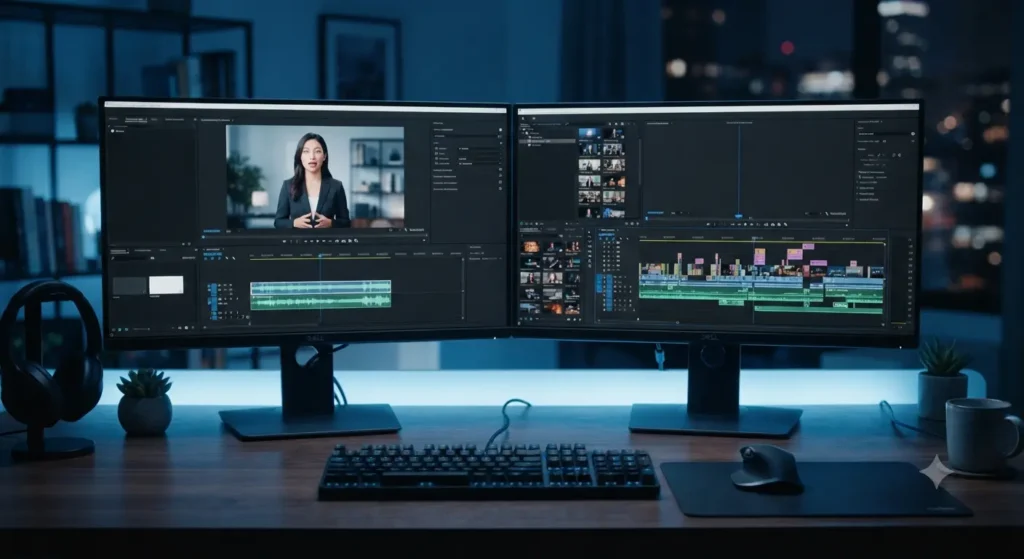
HeyGen and InVideo AI can both produce finished videos, but they solve different problems.
HeyGen is strongest when you want an AI presenter — a digital avatar, cloned voice, or multilingual presenter-led video. InVideo AI takes a broader prompt-to-video approach, built around multiple AI models, scene generation, and general-purpose editing rather than avatar narration.
If your project leans on realistic AI avatars specifically, it’s worth also checking Synthesia, HeyGen’s closest direct competitor in that space — though a full comparison is outside the scope of this guide.
If your idea is “I want an AI person to present my script” — HeyGen is the more obvious choice.
If your idea is “I want AI to build an entire video from a prompt, with scenes, visuals, narration, and editing” — InVideo AI is worth considering.
Neither is automatically better. They’re solving different video-production problems.
Is HeyGen Worth It in 2026?
For the right user, yes — but it isn’t automatically worth $29, $49, or $149 for everyone.
Think about what the platform is replacing:
- Setting up a camera
- Recording yourself repeatedly
- Hiring a presenter
- Recording separate voiceovers
- Building language versions manually
- Assembling presenter videos by hand
If HeyGen saves you from several of those tasks regularly, a paid plan earns its keep. If you only make a couple of videos every few months, it’s harder to justify.
There’s also the credit issue. Someone leaning on lower-cost features (Avatar III, dubbing) will get noticeably more out of 600 credits than someone relying on Avatar IV or Video Agent.
The better question isn’t “Is HeyGen cheap?”
It’s “Will the work HeyGen saves me be worth what I’m paying each month?”
For regular creators, the answer is usually yes.
Who Shouldn't Pay for HeyGen?
Not every reader needs a paid plan. Skip it if:
- You rarely create video
- You only need occasional short clips
- You already have a video workflow you like
- You need detailed, traditional timeline editing
- You want full manual control over every frame
- You dislike usage-based credit systems
- Your projects lean on real cinematic footage rather than AI presenters
HeyGen solves a specific problem very well. That doesn’t make it the right tool for every video project.
HeyGen Pros and Cons
Pros | Cons |
|---|---|
Free plan available, no credit card required | Credit usage varies a lot by feature — 600 credits doesn’t mean 600 minutes |
Realistic AI avatars, including Avatar IV/V | High-credit features (Avatar IV, Video Agent) burn through allowances fast |
Voice cloning on all paid plans | Creator is capped at 600 credits/month with no one-off top-ups |
175+ languages and dialects on paid plans | 4K export requires Pro or higher |
Watermark removal from Creator up | Pro’s price range is wide ($49 to $4,300) depending on volume |
Videos up to 30 minutes on Creator and Pro | Business is overkill and expensive for a solo creator |
Credit rollover on every paid plan | No free tier for the API — programmatic use is billed separately |
Strong collaboration and LMS features on Business | Some projects still need a traditional timeline editor |
What Do Real Users Say?
Beyond HeyGen’s own site, user feedback on review platforms like Capterra and Product Hunt tends to circle back to two things: how natural the avatars and voice cloning look, and how responsive support is when something goes wrong. Users building multilingual content specifically call out the translation quality as a differentiator over recording separate voiceovers by hand.
As with any SaaS review, weigh recent reviews more heavily than older ones — HeyGen’s feature set and pricing have changed multiple times through 2026, and older praise or complaints may not reflect the current credit-based plans.
HeyGen Cancellation and Refunds
Before subscribing, it’s worth knowing what happens if you change your mind.
Canceling stops your next recurring charge, but your paid access and remaining credits generally stay available through the end of the current billing period.
Cancellation isn’t automatically the same thing as a refund.
For the current legal terms, see HeyGen’s Terms of Service.
If you’re unsure whether you’ll use HeyGen regularly, Free is the safer place to start.
Frequently Asked Questions
Is HeyGen free?
Yes. HeyGen’s Free plan offers up to 3 videos a month, each capped at 1 minute, with limited access to Avatar IV.
How much does HeyGen cost in 2026?
Free starts at $0/month. Creator is $29/month, Pro starts at $49/month (scaling up to $4,300/month for higher credit tiers), and Business is $149/month plus $20 per additional seat. Enterprise is custom-priced.
Is HeyGen Creator worth $29?
For regular solo creators, usually yes. Creator includes 600 monthly credits, 1080p export, videos up to 30 minutes, voice cloning, watermark removal, and 175+ languages and dialects.
Does HeyGen offer an annual discount?
Yes. Creator drops to an effective $24/month billed annually — about 17% off. Pro and Business also offer annual discounts; confirm the exact rate at checkout since HeyGen doesn’t always display it upfront on the pricing page.
How many credits do I get with HeyGen Creator?
600 credits per month.
How many credits do I get with HeyGen Pro?
The starting tier includes 1,000 credits per month for $49. Higher Pro tiers scale up to 100,000 credits/month at $4,300/month.
Do HeyGen credits roll over?
Yes. Monthly subscribers roll unused credits over for one additional billing cycle. Annual subscribers accumulate unused credits until their renewal date.
Can I run out of HeyGen credits?
Yes — how fast depends on which avatar model and features you use. Creator and Pro users need to upgrade tiers to get more; Business users can also buy one-time top-ups or enable auto-reload.
Does HeyGen have voice cloning?
Yes, included on Creator and every plan above it.
Does HeyGen remove the watermark?
Yes, on Creator, Pro, and Business.
Is HeyGen good for YouTube?
Yes, especially for presenter-led, faceless, educational, marketing, or multilingual videos.
Does HeyGen charge separately for API access?
Yes. Subscription plans cover the web app only. Programmatic/API use is billed on a separate pay-as-you-go model with no permanent free tier.
Is HeyGen better than InVideo AI?
Neither is automatically better. HeyGen is stronger for AI avatars and presenter-led video; InVideo AI is built around broader prompt-based video creation across multiple AI models.
What happens if I cancel HeyGen?
Paid access continues through the current billing period. After that, your account moves to the Free plan, and unused credits expire.
Final Verdict: Is HeyGen Worth the Money?

Overall: 9/10
HeyGen is a strong option if you want professional-looking presenter videos without building an entire production process around a camera, microphone, presenter, and traditional editing workflow.
Free is a genuinely good starting point. Creator at $29/month is the plan I’d recommend to most individual creators ready to use HeyGen regularly. Pro makes sense once you need 4K, more credits, or heavier usage — and it scales well past its $49 entry price if your volume grows. Business at $149/month is for teams that need collaboration and administration, not just more video generation.
The one thing worth paying close attention to is credit usage. Don’t pick a plan just because the credit number looks big — a 600-credit allowance can mean wildly different amounts of usable video depending on which features you actually use.
My final picks
Best for testing: Free
Best for most solo creators: Creator
Best for heavy individual use: Pro
Best for teams: Business
Best for large organizations: Enterprise
If you’re still unsure, start with Free. Make a few real videos, try the avatars, test voice cloning, and see how quickly you burn through credits. Upgrade once you have a concrete reason to — that’s a better way to decide than picking the most expensive plan on the page.
Pricing and features change often. Always verify the current price and credit allocation on HeyGen’s official pricing page before subscribing. Last verified against heygen.com/pricing in August 2026.